How Long Does Scan-to-BIM Take? Timeline Guide
Filed under
Robotic ImagingMarch 17, 2026
How Long Does Scan-to-BIM Take? Project Timeline Explained
Scan-to-BIM projects typically take 10-14 business days from field scanning to final deliverables. Five phases make up the timeline: field Laser Scanning (2-3 days), point cloud processing (3-5 days), BIM modeling in Revit (7-10 days for LOD 300), quality control (1-2 days), and client review with revisions (3-5 days plus 1-2 days). Rush delivery takes 5-7 days at a 15-25% premium.
That total surprises many first-time clients. The scanning itself feels like the main event — crews, equipment, a couple of days on-site — but the field capture is actually the shortest phase. The modeling work that follows takes far longer, and skipping that reality in your project schedule creates hard deadline pressure later. Understanding all five phases upfront puts you in control of the timeline from day one.
Standard Scan-to-BIM Timeline
The standard scan-to-BIM timeline runs 10-14 business days from the moment field crews complete scanning to when you receive final deliverables. That benchmark applies to most commercial buildings at LOD 300 — the most common level of detail requested for renovation, facilities management, and design coordination work.
For context, traditional surveying methods typically require 3-5 weeks to produce comparable documentation. Scan-to-BIM's speed advantage comes from capturing an entire building's geometry in 2-3 days of field work rather than weeks of manual measurement. The time savings are real — but the pipeline still requires careful scheduling.
If your project has a critical deadline, rush delivery options exist. Professional scan-to-BIM providers can compress the timeline to 5-7 business days, typically at a 15-25% cost premium. That option is covered in detail below.
Workflow Phase Breakdown
Phase 1 — Field Laser Scanning (2-3 days)
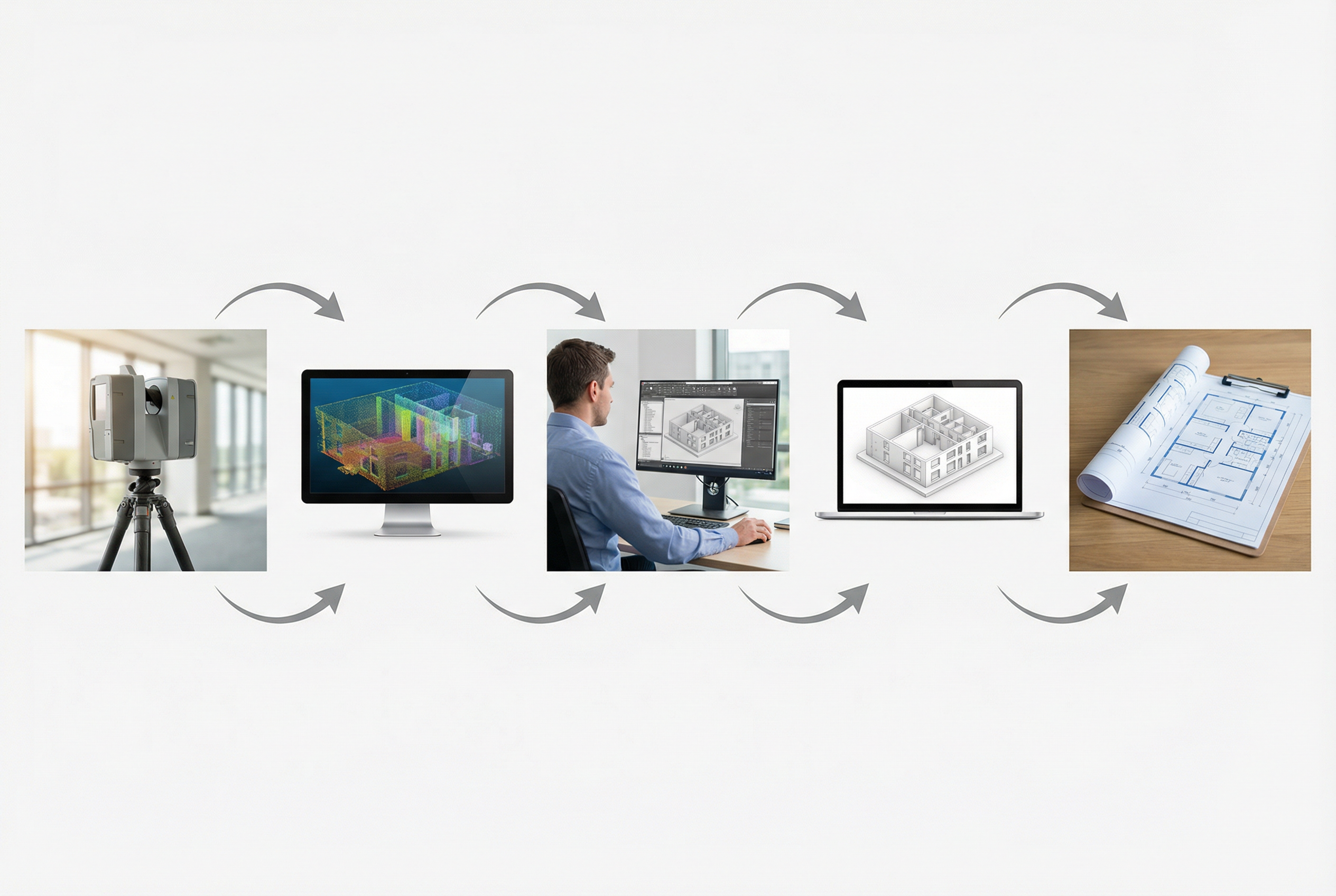
A scanning crew sets up specialized equipment at multiple positions throughout your building, capturing millions of precise measurements at each location. Think of it like a photographer covering every room — each setup position captures one "shot," and a standard commercial building requires anywhere from 10 to 50+ positions depending on size and layout. Small buildings under 5,000 square feet typically finish in a single day. Standard commercial spaces in the 25,000-50,000 square foot range take 2-3 days. Large industrial or healthcare facilities over 75,000 square feet can run 3-5 days. Retail stores often schedule scanning overnight to avoid disrupting business operations — a common and practical accommodation.
Phase 2 — Point Cloud Processing (3-5 days)
Raw scan data doesn't come out of the scanner ready to use. Think of this phase like developing film before you can see the photographs — the data exists, but it requires processing before it's usable. Technicians combine, align, and clean the scans from every position into one unified dataset, then export it into standard file formats (RCS, E57, LAS). This phase often begins overlapping with the early stages of modeling, which is how experienced providers compress total delivery time without cutting corners.
Phase 3 — BIM Modeling (7-10 days for LOD 300)
This is the longest single phase — and the one most clients don't anticipate. Skilled technicians use the Point Cloud data as a reference to manually build an accurate 3D BIM model in Revit. It's similar to an architect tracing precise construction documents from a photograph: the photo guides every measurement, but creating the actual drawing takes considerable skilled time. At LOD 300 — which includes walls, floors, ceilings, doors, windows, and major structural elements with accurate geometry — modeling a 25,000 square foot building typically takes 7-10 days.
Phase 4 — Quality Control (1-2 days)
Before any deliverable reaches a client, it goes through internal review. Technicians check model accuracy against the Point Cloud, verify dimensions, confirm that all requested elements are modeled correctly, and ensure file formats meet project specifications. This phase is short but non-negotiable for reliable deliverables.
Phase 5 — Client Review and Revisions (3-5 days + 1-2 days)
After delivery, clients typically have 3-5 business days to review the model and documentation. Revision requests — clarifying a wall dimension, adding a missed element, adjusting a floor plan detail — are incorporated within 1-2 business days. This phase is almost universally left out of initial project schedules, which is why total elapsed time from scanning to truly final deliverables often lands at 15 business days rather than 12.
Timeline Variables — What Affects Duration?
Several factors push a project toward the shorter or longer end of the 10-14 day range.
Building size matters, but not linearly. Doubling the square footage doesn't double the timeline — it's more nuanced than that, tied to the number of distinct spaces, floors, and systems to document.
Level of Development (LOD) has the largest single impact on modeling duration. LOD 300 is the baseline at 7-10 days. LOD 350 — which adds connection details and coordination geometry — increases modeling time by 30-50%. LOD 400, which includes fabrication-level detail, adds 70-100% to the modeling phase. Choosing the right Level of Development for your actual project need is the most consequential scheduling decision you'll make.
Building complexity matters independently of size. A 50,000 square foot retail box with simple geometry models faster than a 30,000 square foot healthcare facility packed with MEP systems (Mechanical, Electrical, and Plumbing infrastructure).
Site accessibility also adds time. Scanning an unoccupied building is straightforward. Occupied buildings with restricted access windows add 10-20% to field time, which cascades through the rest of the schedule.
Typical Timelines by Building Type
These ranges reflect standard LOD 300 delivery for each building category:
| Building Type | Size Range | Typical Timeline |
|---|---|---|
| Retail store | 2,000–5,000 SF | 8–10 days |
| Office building | 25,000 SF | 10–12 days |
| Industrial facility | 75,000 SF | 12–14 days |
| Healthcare facility | 50,000 SF | 14–16 days |
| Historic building (LOD 400) | 15,000 SF | 16–20 days |
Multi-location programs — scanning several stores or facilities on a rolling schedule — often achieve compressed per-site timelines through parallel processing workflows.
Rush Delivery Options
When a project is on critical path, rush delivery compresses the standard 10-14 day timeline to 5-7 business days. This option is real and commonly available, but comes with clear terms worth understanding upfront.
Rush delivery typically applies to LOD 300 only — the complexity of LOD 350 or LOD 400 modeling doesn't compress well without sacrificing accuracy. It carries a 15-25% cost premium reflecting overtime modeling hours and expedited processing. Buildings with straightforward geometry are the best candidates; highly complex facilities with dense MEP systems may not qualify.
The most important thing to know: communicate your deadline before scanning begins, not after. Rush delivery requires the entire workflow to be restructured from day one — it can't be requested retroactively once standard processing has started.
Planning Guidance — Integrating Scan-to-BIM Into Your Project Schedule
Building a realistic schedule around Scan-to-BIM comes down to four practical rules.
Use 10-14 days as your planning baseline for standard LOD 300 work. Don't plan to design-development kickoff meetings on day 11 — build a buffer.
Include the client review phase explicitly. Budget 3-5 days for your team to review deliverables and 1-2 days for revisions. Total elapsed time from scanning complete to truly final files is typically 15 business days, not 12.
Communicate critical dates at project kickoff. If you have a hard deadline — a permit submission, a construction start, a client presentation — share that date before field work begins. That allows the provider to structure the workflow accordingly from the start.
Align scanning with your project phase. For preconstruction work, scanning should complete before design development begins. For as-built closeout documentation, plan scanning after substantial completion but before punch list completion. Both scenarios have scheduling implications that affect your broader project calendar.
Summary
The standard scan-to-BIM timeline is 10-14 business days for most commercial projects at LOD 300, with total elapsed time reaching 15 days when client review is properly included. Field Laser Scanning takes 2-3 days. Point Cloud processing takes 3-5 days. BIM modeling in Revit takes 7-10 days — the longest single phase. Quality control adds 1-2 days, and client review adds another 3-5 days plus revision time.
The biggest planning mistake is treating the scan as the deliverable. It isn't — it's the data source. The model is the deliverable, and modeling takes time that can't be skipped or compressed without trade-offs.
If your deadline requires faster turnaround, rush delivery at 5-7 business days is a genuine option with a 15-25% premium. For most projects, building the standard 10-14 day window into your schedule — with explicit time for client review — produces the smoothest outcome and the most accurate final BIM model.
Written by
Robotic Imaging