LOD 300 vs LOD 350 vs LOD 400: BIM Level Guide
Robotic ImagingMarch 13, 2026
LOD 300 vs LOD 350 vs LOD 400: Complete BIM Detail Level Comparison
Choosing between LOD 300, LOD 350, and LOD 400 is one of the most consequential decisions in any Scan-to-BIM project specification. Over-specify and you pay 40–60% more for detail your contractor will never use. Under-specify and you face coordination failures and rework that cost far more than the upgrade would have. LOD 300 provides accurate dimensions for design development (±2 inches), LOD 350 adds MEP connections and penetrations for construction coordination (±1 inch), and LOD 400 delivers fabrication-ready assembly detail (±1/2 inch). LOD 350 costs 20–30% more than LOD 300; LOD 400 costs 40–60% more. This guide gives you the BIM LOD comparison framework to specify correctly the first time.
Why LOD Selection Determines Project Success
Level of Development — not "Level of Detail," a common misconception — defines both the geometric completeness and the attached information reliability of each BIM element. The distinction matters: an element can look highly detailed geometrically while carrying unreliable dimensional data, or it can be geometrically simple but dimensionally accurate. LOD governs both simultaneously.
The practical stakes of choosing between LOD 300, LOD 350, and LOD 400 in a scan-to-BIM context are significant. Selecting a level too low means your BIM model lacks the connection detail needed for MEP clash detection — and your coordination team discovers conflicts in the field rather than in the model. Selecting a level too high on systems that don't require it inflates both modeling time and cost without delivering corresponding project value.
Most project failures in this domain aren't technical failures. They're specification failures: a BIM manager writes "LOD 300" on the RFP without fully understanding what LOD 350 would add, or specifies LOD 400 across all systems when only MEP requires that precision. Understanding the level of development differences across these three adjacent levels eliminates that risk entirely.
LOD Standards and Definitions: AIA E202-2008 and BIM Forum LOD Spec
The formal framework for BIM detail level standards originates from two sources that every specification should reference. The AIA E202-2008 document established the foundational LOD framework that defined levels 100 through 500 as a progression of model element author responsibility. The BIM Forum LOD Specification, updated regularly, extends this framework with element-by-element guidance covering hundreds of building components across architectural, structural, and MEP systems.
Under these standards, each LOD level adds both geometric precision and information requirements:
| LOD Level | Accuracy Tolerance | Geometry | Attached Information |
|---|---|---|---|
| LOD 300 | ±2 inches | Quantity, shape, location, orientation | Specifications, material properties |
| LOD 350 | ±1 inch | All LOD 300 + interface/connection elements | Coordination data, system relationships |
| LOD 400 | ±1/2 inch | All LOD 350 + fabrication-level assembly | Fabrication, installation, shop drawing data |
A critical point: LOD is not a project-wide binary setting. A single Revit deliverable can contain architectural elements modeled at LOD 300 while MEP systems within the same file are modeled at LOD 350. This mixed-LOD specification approach is standard practice for complex renovations and is explored further in the decision framework section below.
LOD 300: Design Development Detail
LOD 300 is the baseline for most renovation, remodel, and design development projects — and it is sufficient for a wider range of applications than many project managers initially assume.
At LOD 300, every modeled element has accurate quantity, size, shape, location, and orientation. Walls are modeled at correct thickness with accurate material layers. Structural members reflect actual dimensions. MEP systems appear in correct locations with accurate pipe and duct sizes. The model is dimensionally reliable enough to produce permit-set drawings, support contractor bidding, and enable space planning decisions.
What LOD 300 does not include: connection details between systems, interface elements (hangers, supports, penetrations through structure), and fabrication-level specificity. A duct appears in the correct location at the correct size — but its hanger system, its sleeve through the slab above, and its precise routing around structural interferences are not modeled.
Accuracy: ±2 inches — sufficient for all design development decisions and permit submissions, but not sufficient for clash detection between closely spaced MEP systems.
Timeline: LOD 300 BIM modeling typically runs 7–10 days. Providers delivering LOD 300 models — such as Robotic Imaging's standard Scan-to-BIM workflow — typically complete field capture in 2–3 days with total delivery in 10–14 days.
Cost: LOD 300 is the baseline cost reference. LOD 350 and LOD 400 premiums are measured against this level.
Best for: Design development, permit submissions, contractor bidding, space planning, renovation design, and multi-location rollout programs.
LOD 350: Construction Coordination Detail
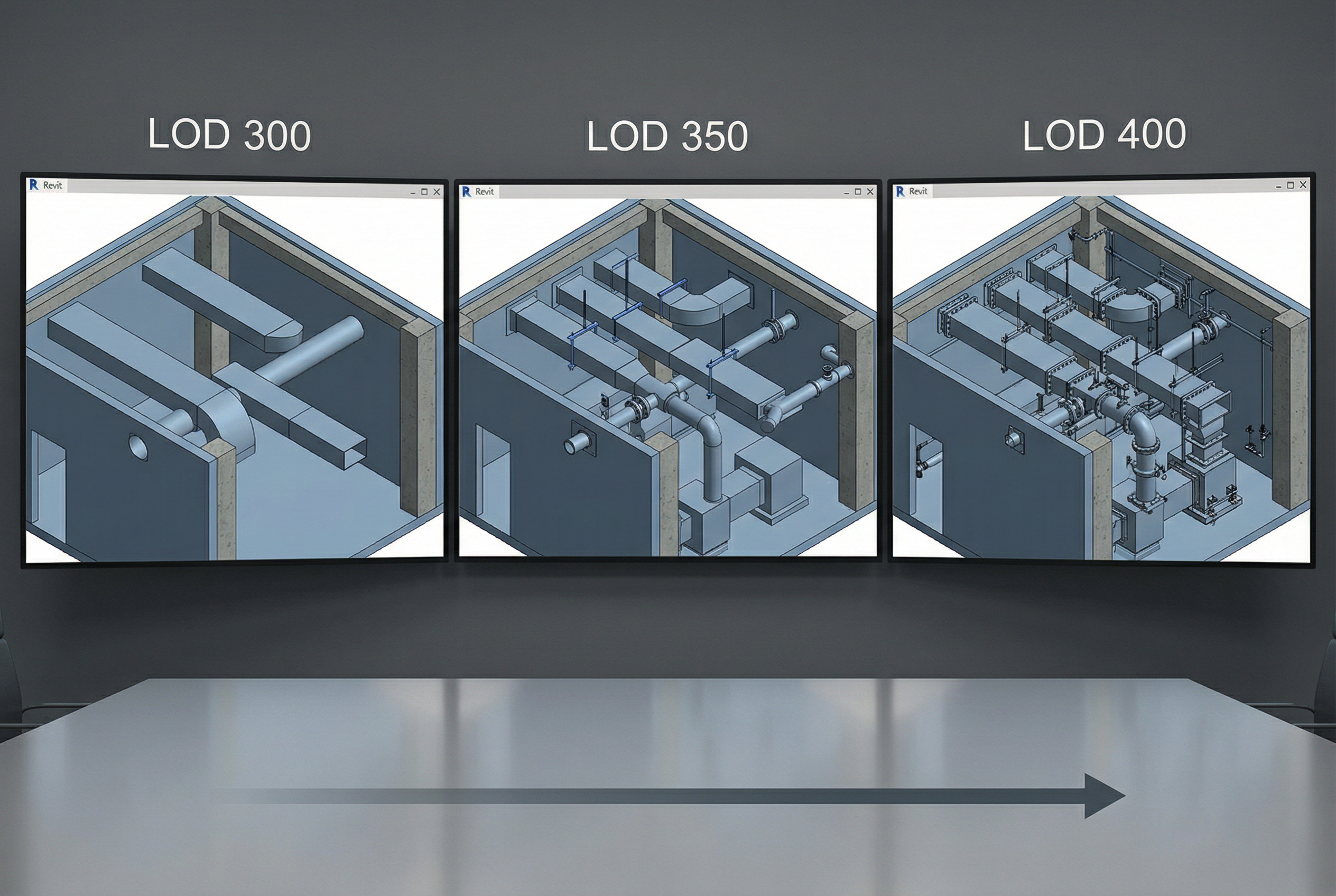
LOD 350 is the workhorse level for projects involving MEP coordination, above-ceiling congestion, or any scenario where multiple building systems must coexist in constrained spaces. It adds everything LOD 300 includes, plus the interface and connection elements that make clash detection meaningful.
At LOD 350, MEP systems are modeled with hangers, supports, insulation clearances, and penetrations through structural elements. Pipe connections are shown at fittings. Duct transitions, offsets, and terminations are accurately modeled. Structural connections include plates, bolts, and bracing elements. The model now contains enough information to identify conflicts between systems before they become field problems.
What LOD 350 does not include: fabrication-level detail. Pipe fittings are shown accurately located, but not modeled to the specific manufacturer's dimensions a fabricator would need to pre-assemble sections off-site.
Accuracy: ±1 inch — sufficient for construction coordination and clash detection workflows.
For MEP coordination specifically: LOD 350 is the minimum required level. Point cloud data captured with equipment like the LEICA RTC 360 — which captures 2,000,000 points per second at ±2mm accuracy — provides the underlying data density required to support LOD 350 MEP coordination modeling with confidence.
Timeline: LOD 350 modeling runs 9–13 days (+30–50% over LOD 300 baseline). Total project delivery extends accordingly.
Cost: LOD 350 carries a 20–30% premium over LOD 300 baseline pricing.
Best for: Healthcare facility renovations, complex commercial interiors, above-ceiling MEP coordination, tenant improvement projects in occupied buildings, and any project where clash detection is a defined deliverable.
LOD 400: Fabrication-Ready Detail
LOD 400 is the most detailed and most expensive level — and it is genuinely necessary in fewer scenarios than its technical sophistication might suggest.
At LOD 400, every modeled element contains fabrication and assembly information. MEP components reflect manufacturer-specific dimensions. Structural connections are modeled to bolt-and-weld detail. Ductwork segments are sized and sequenced for shop fabrication. The model is, in principle, sufficient to generate shop drawings and fabrication packages directly.
Accuracy: ±1/2 inch — the precision required when pre-fabricated assemblies must fit exactly within existing conditions captured by the point cloud.
Timeline: LOD 400 modeling runs 12–16 days (+70–100% over LOD 300 baseline). For large facilities, this timeline impact is substantial.
Cost: LOD 400 carries a 40–60% premium over LOD 300 baseline pricing.
When LOD 400 is genuinely necessary: Historic preservation projects where custom-fabricated elements must match original conditions precisely. Modular MEP prefabrication programs where off-site assembly must integrate with documented existing conditions. Complex structural interventions requiring fabrication-level connection design.
When LOD 400 is overkill: Standard commercial renovation. Tenant improvement projects. Most healthcare facility upgrades. Any project where MEP systems will be installed conventionally rather than prefabricated off-site.
LOD Selection Framework: Matching Detail Level to Project Requirements
The right LOD level follows from three project variables: phase, coordination complexity, and budget constraint.
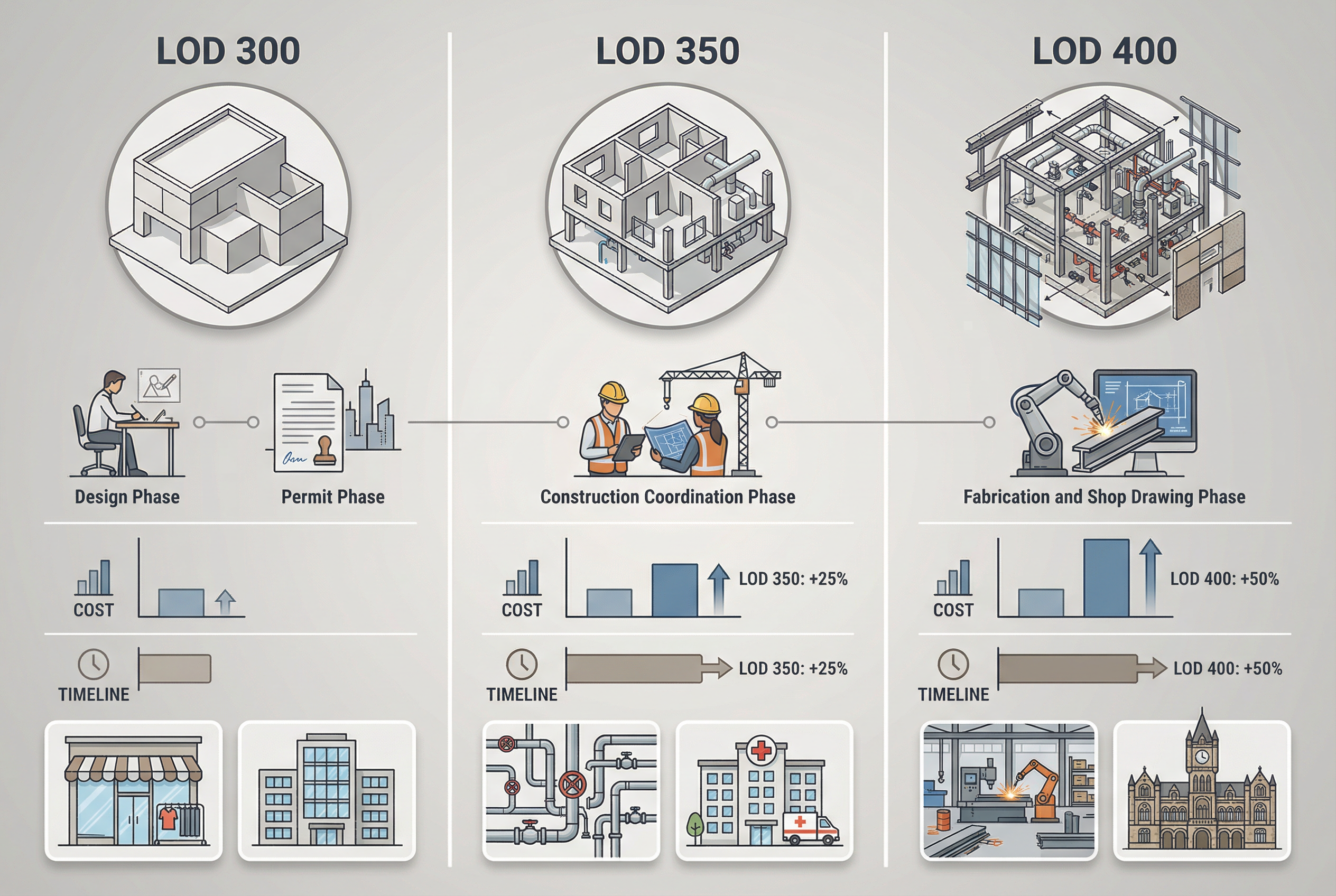
Phase: If you are in design development or preparing permit documents, LOD 300 is almost always correct. If your team is performing MEP coordination or clash detection, LOD 350 is the minimum. If you are generating fabrication packages, LOD 400 is required.
Coordination complexity: Count the number of MEP systems occupying your most constrained ceiling or mechanical room space. Two systems with generous clearance — LOD 300 is sufficient. Three or more systems within 18 inches of each other — LOD 350 is required to detect conflicts reliably.
Budget optimization through mixed-LOD specification: This is the most underutilized tool in BIM specification. Architectural elements (walls, floors, ceilings, structural members) can be delivered at LOD 300 while MEP systems within the same Revit file are delivered at LOD 350. This hybrid approach captures coordination-grade MEP data without paying the LOD 350 premium across the entire model — typically producing 10–15% cost savings versus blanket LOD 350 specification.
What LOD level do I need? If your project involves neither MEP coordination nor off-site fabrication, specify LOD 300. If coordination is required, specify LOD 350 for MEP systems and LOD 300 for architectural. If prefabrication is planned, specify LOD 400 for affected systems only.
Industry-Specific LOD Recommendations
Retail renovation programs: LOD 300 is the industry standard. Retail renovation programs — including multi-location chains — almost universally specify LOD 300, which provides sufficient detail for contractor bidding, permit submissions, and store remodels without the cost premium of higher levels. Robotic Imaging's Fortune 500 retail clients, including 7-Eleven, Kroger, and Ross, document at LOD 300 across large-scale rollout programs.
Complex commercial and healthcare facilities: LOD 350 for MEP systems is standard practice. Occupied buildings with active mechanical, electrical, and plumbing systems require coordination-grade modeling to avoid disruption during construction.
Historic preservation and modular prefabrication: LOD 400 is justified when custom fabrication must interface with precisely documented existing conditions. In all other scenarios, LOD 300 or LOD 350 delivers better value.
Making the Right LOD Decision
The LOD 300 vs LOD 350 vs LOD 400 decision ultimately comes down to what your team will do with the model. Design development and permit work: LOD 300, 7–10 days of modeling, baseline cost. MEP coordination and clash detection: LOD 350 for MEP systems, 9–13 days, 20–30% premium. Off-site fabrication or historic precision work: LOD 400, 12–16 days, 40–60% premium.
The mixed-LOD approach — specifying LOD 350 only for MEP while keeping architectural elements at LOD 300 — consistently delivers the best value-to-detail ratio for complex renovation projects. Write this explicitly into your RFP rather than applying a single LOD designation project-wide.
For most commercial renovation, retail remodel, and tenant improvement projects, LOD 300 remains the correct specification. Upgrade to LOD 350 when your construction documents require coordination-grade MEP data. Reserve LOD 400 for the rare scenarios that genuinely require it.
Written by
Robotic Imaging