Store Managers: Mobile Asset Management Platform
Robotic ImagingApril 9, 2026
Mobile Asset Management Platform for Store Managers
For store managers responsible for daily retail operations, equipment management has historically been a corporate-controlled function — store teams operate equipment they know nothing about, and access equipment data only when something breaks. Robotic Imaging's mobile asset management platform for store managers changes this dynamic: intuitive smartphone tools enable 30-second equipment documentation during existing morning store walks, QR code instant access to equipment specifications and service history, and mobile work order submission from the equipment location — no facilities expertise or desktop access required.
Store managers at 1,000+ 7-Eleven locations already use this workflow. The question is whether your stores are capturing the same operational advantage.
Store Managers Deserve Better Than Waiting for Corporate Facilities
Walk into any retail equipment room and you'll find the same situation: HVAC units, refrigeration compressors, water heaters, and electrical panels — equipment worth tens of thousands of dollars — with no accessible information about when they were last serviced, how old they are, or who to call when something fails.
Store managers aren't equipment technicians. That's not a failure — it's reality. The problem is that the systems built to manage this equipment were designed for facilities teams, not the retail operations professionals actually running stores day to day. Desktop-dependent platforms with complex navigation menus assume the user has facilities training, a desk, and 30 minutes to spare. Store managers have none of those.
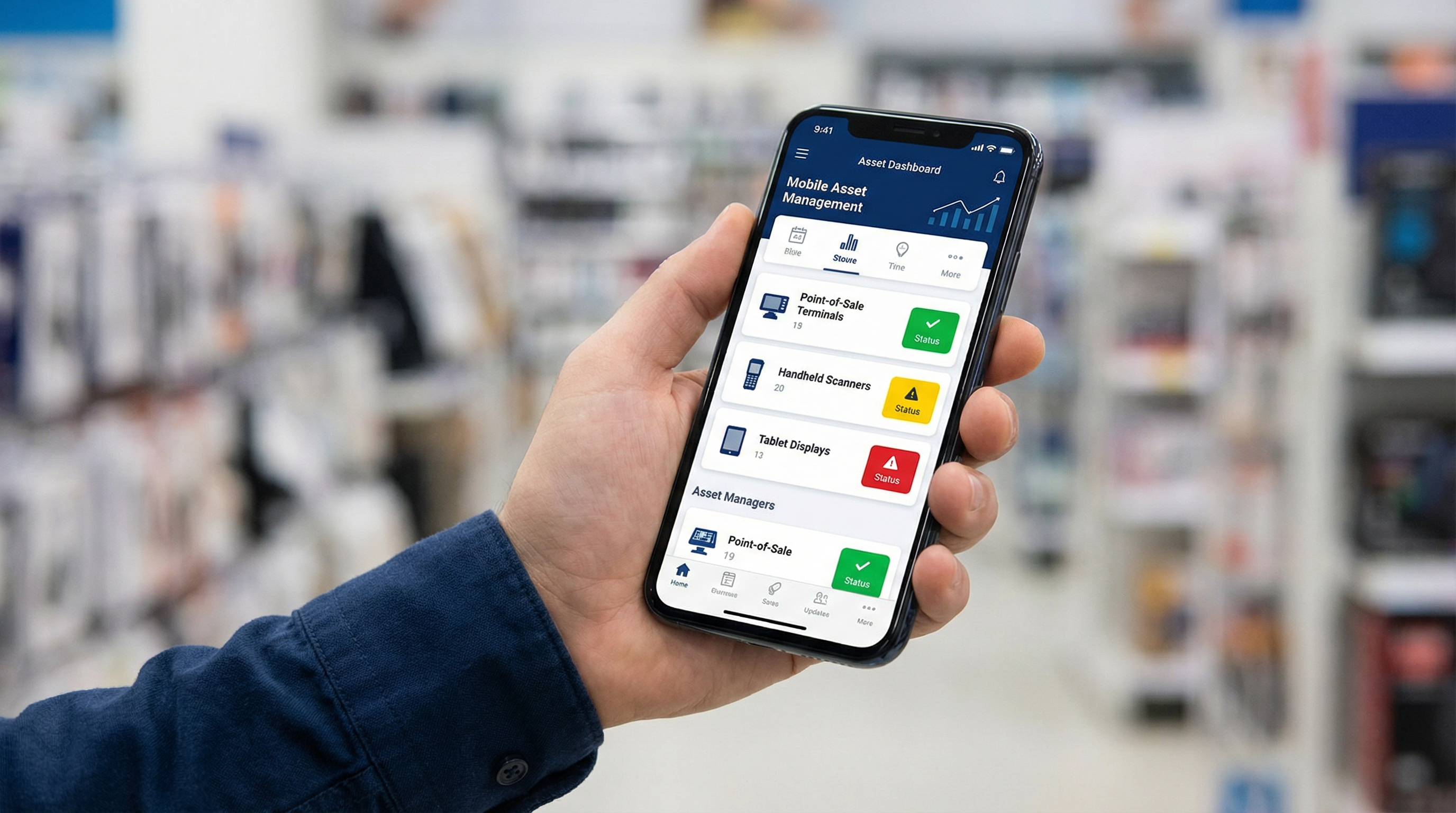
Mobile asset management for store managers solves a fundamentally different problem: enabling store-level equipment ownership without facilities expertise. Store managers photograph equipment nameplates in 30 seconds during daily store walks — completing entire store documentation in 5-10 minutes — scan QR codes for instant specifications and service history, submit work orders from equipment location with pre-populated details, and monitor store equipment inventory and maintenance status on a mobile dashboard requiring only 10-15 minutes of training.
This is the operational capability store managers have needed but never had — and it starts with an app that doesn't require any technical background to use.
Ready to see how it works for your stores? [Request a Store Manager Platform Demo →]
An Intuitive Smartphone App Built for Retail Operations, Not Equipment Technicians
The most common objection to any new platform is staffing: "My team isn't technical enough for this." With Robotic Imaging's platform, that objection dissolves within the first 15 minutes.
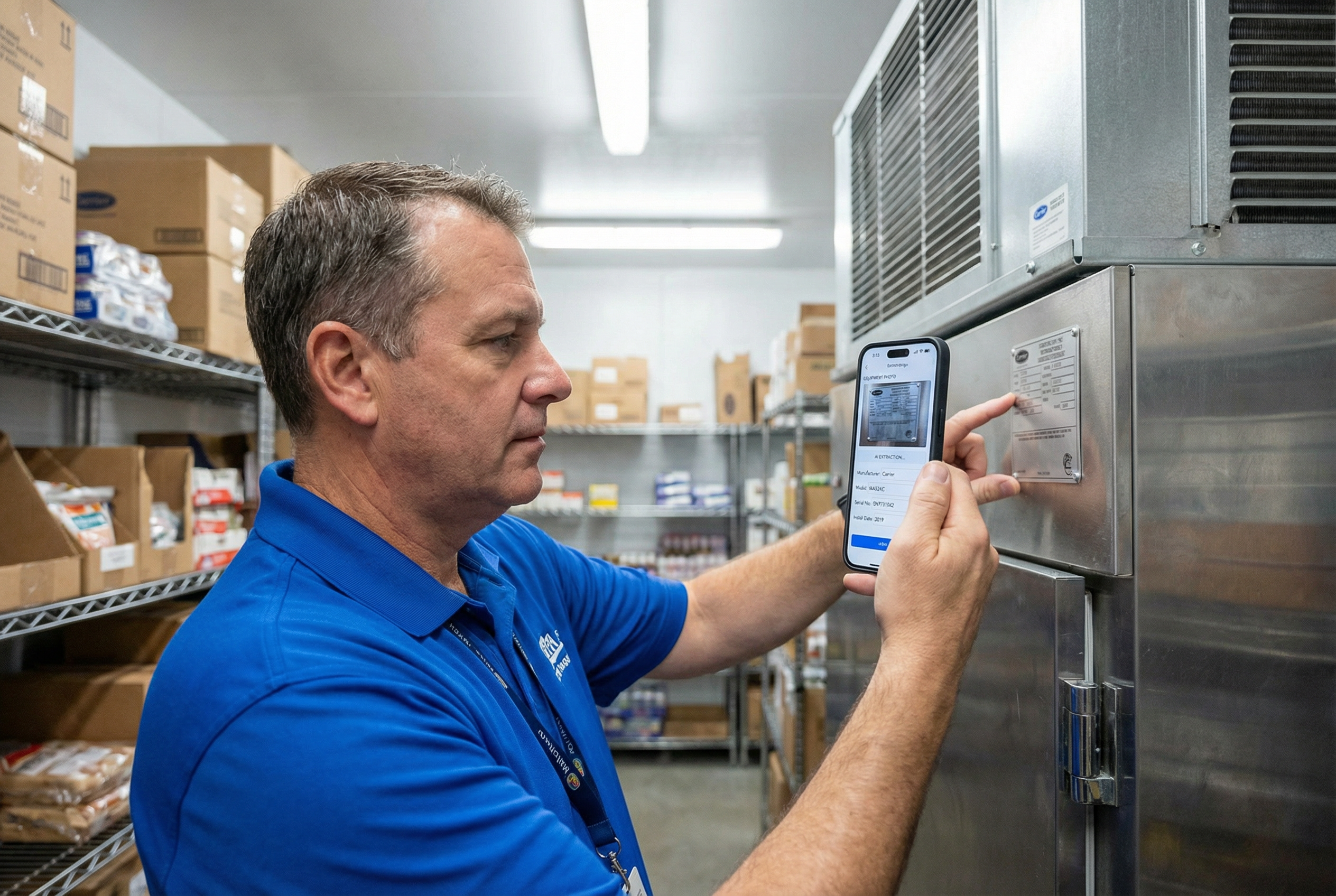
The app is camera-first by design. Open it, point your smartphone camera at a piece of equipment, and photograph the nameplate. That's the workflow. No complex menu navigation. No manual data entry of model numbers or serial numbers you've never heard of. No desktop required.
Once the photo is captured, Robotic Imaging's AI extracts manufacturer, model, and serial number with 85-90% accuracy — processing in seconds what would take several minutes of manual typing, assuming the store manager even knew what to type. At the 12-month mark, extraction accuracy improves to 90%+ as the AI calibrates to your specific equipment inventory. For a store manager who doesn't know the difference between a condenser unit model number and a compressor serial number, this is the difference between a platform that's usable and one that sits untouched.
The native iOS and Android apps — not mobile web, not a desktop portal — load equipment records in under 2 seconds with 60fps scrolling. Everything is designed for someone moving through a store, not sitting at a workstation.
A practical scenario: A new store manager joins and needs to understand the store's equipment baseline. After a 10-15 minute orientation — the verified training requirement — they open the app and document their first store in under 20 minutes. No facilities background required. No IT support ticket. No waiting for corporate to send someone to assess equipment. The store manager owns that data from day one.
The offline capability matters here, too. Equipment rooms, basements, and rooftop access points routinely have zero WiFi signal. Robotic Imaging's platform caches 1,000+ equipment records locally on the device, so documentation happens in dead zones without interruption. When connectivity returns, everything syncs automatically. There's no version of this workflow that fails because the equipment room doesn't have a strong signal.
This is what a retail operations mobile app looks like when it's built specifically for store teams — not adapted from a platform designed for maintenance technicians.
Five-to-Ten Minutes During the Morning Walk You're Already Taking
The most effective platforms don't ask users to change their behavior — they fit into routines that already exist. Store managers conduct morning store walks. That habit is already baked into the job. Robotic Imaging's mobile asset management platform integrates into that existing routine rather than sitting on top of it as a separate initiative.
At 30 seconds per equipment item, a store with 15-20 major equipment assets takes 7-10 minutes to document completely. That's a single morning walk. Not a day set aside for an asset audit. Not a facilities team dispatched from corporate. One regular morning, with the same smartphone already in the store manager's pocket.
Consider a Monday morning in the dairy section: A store manager is checking product temperatures as part of the standard opening routine — they already stop at every refrigeration case. Instead of moving past the equipment, they pause for 30 seconds to photograph the nameplate on the refrigeration unit. The AI extracts the specs. The unit is now in the system. That interaction added 30 seconds to an existing stop, not 30 minutes to the schedule.
This incremental approach also reduces the psychological barrier to getting started. Store managers don't need to block out time for an asset documentation project. The instruction is simple: during the next five morning walks, photograph one section of the store each day. By Friday, the entire store is documented. By the following week, that data is accessible by anyone who needs it — corporate facilities, regional managers, service vendors — without a single desktop login or manual spreadsheet update.
This is what mobile store operations looks like in practice: not a new workload, but a 5-10 minute extension of a routine that was already happening.
QR Code Equipment Access: Every Spec, Every History Record, One Scan
Documentation is the foundation. QR code access is where the daily operational value becomes undeniable.
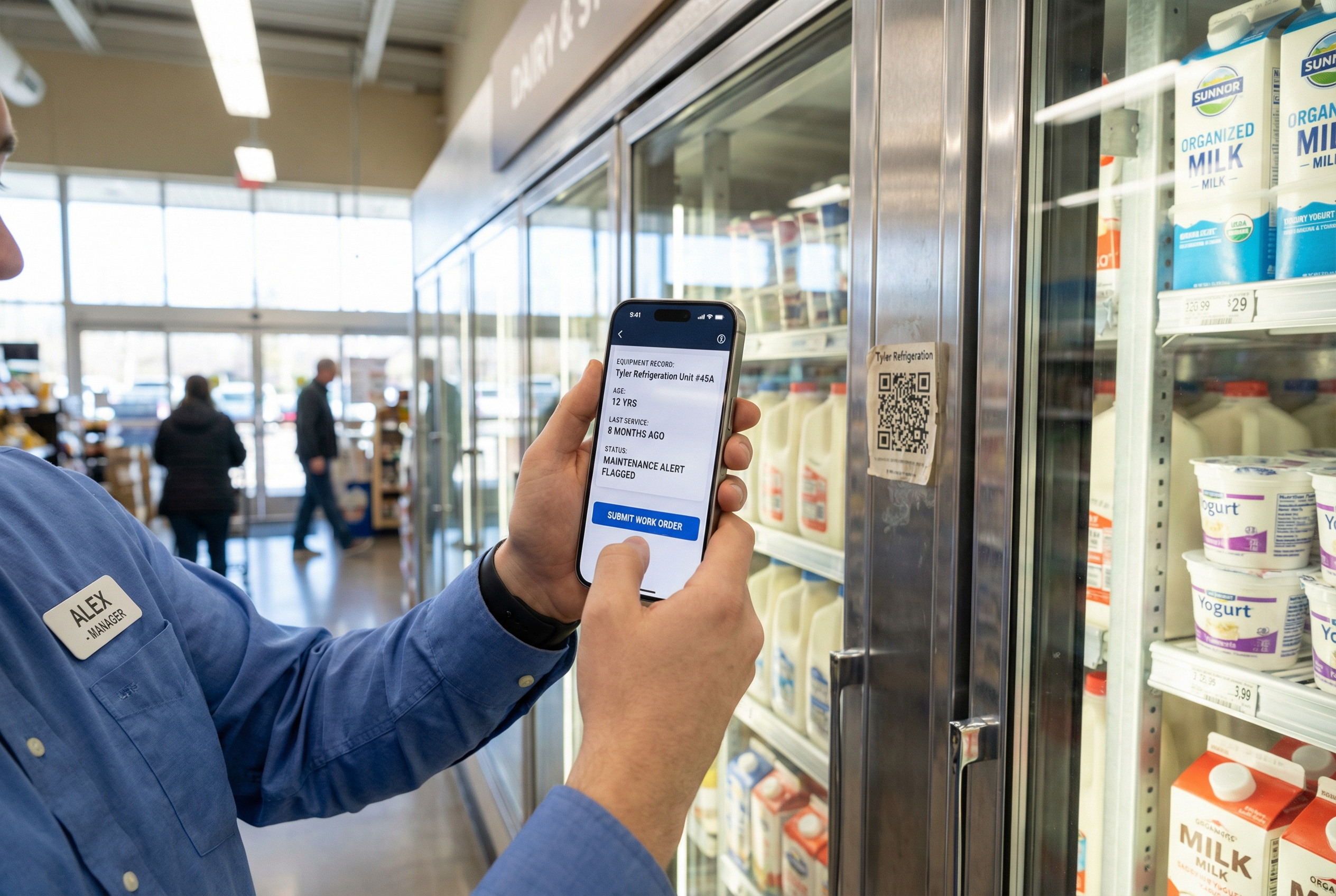
Once equipment is documented and a QR label is applied — at $0.01-0.05 per label, cost is essentially zero — any store manager, assistant manager, or authorized team member can scan that label with their smartphone and immediately see the complete equipment record: manufacturer, model, serial number, installation date, full service history, active maintenance alerts, and a direct work order submission button. No login to a desktop system. No call to corporate facilities to ask "when was the last time someone serviced this unit?" The answer is right there, accessible from the equipment location.
How do store managers track equipment without a facilities team? The QR code workflow answers this directly. Previously, a store manager experiencing a problem with a piece of equipment had two options: call a facilities help line and wait, or call a random service vendor and hope. With Robotic Imaging's platform, a third option exists: scan the QR code, review the equipment's service history and age, assess whether the issue warrants a priority work order or a scheduled maintenance visit, and submit that work order in under two minutes — all without leaving the equipment location and without needing to know the model number, the preferred vendor, or the maintenance interval from memory.
A realistic scenario: A customer complains about a warm dairy case at 8am. The store manager walks to the refrigeration unit, scans the QR label, and immediately sees the unit is 12 years old with its last service visit 8 months ago. That context — age and service history together — tells the store manager this isn't a routine temperature fluctuation. They submit a priority work order with the equipment details pre-populated. By 9am, a technician is dispatched. Without the QR code access, the store manager calls facilities, reads off an equipment number from a faded nameplate sticker, and waits for a callback — assuming anyone at facilities knows the service history for that specific unit.
How do QR codes work for store equipment tracking? QR labels are applied to equipment during or after the documentation phase. Scanning with any smartphone camera launches the equipment record within the Robotic Imaging platform — no separate QR scanning app required. The record is always current because it syncs with every work order submission, every service technician update, and every maintenance event logged against that asset.
This is QR code store access designed for retail store operations — not check-in/check-out inventory management, but complete equipment intelligence on demand.
Mobile Work Order Submission from the Equipment Location
Work orders submitted at a desk, from memory, with a general location description ("the cooler in the back, I think it's the left one") create downstream problems: wrong equipment dispatched to, incomplete information for vendors, service delays from back-and-forth clarification calls.
Robotic Imaging's platform eliminates that friction by enabling mobile work order submission from the equipment location, with the relevant data pre-populated from the scanned asset record.
When a store manager scans the QR code on a unit and taps the work order button, the form arrives pre-filled with manufacturer, model, serial number, location within the store, and full service history. The store manager adds their observations — "scraping noise from fan at startup, intermittent, started this morning" — attaches a photo or video of the issue, selects a priority level, and submits. The work order routes automatically based on equipment type and priority.
Can store managers submit maintenance work orders from their phone? Yes — and the design intent is specifically to make submission possible from the exact point of problem observation, not from a desktop after the fact. A store manager who hears a scraping noise from rooftop HVAC during an equipment check can scan the unit's QR label, document what they're hearing in real time, attach a 10-second video of the noise, and set Priority High before leaving the roof access. A service technician with that level of documented detail — equipment age, service history, audio/video of the issue, priority context — can often diagnose and prepare for the job before arriving on site. That's a fundamentally different service experience than a work order that says "HVAC making noise, please check."
The mobile work order workflow also creates accountability in both directions. Store managers can track the status of every submitted work order from the platform — dispatched, in progress, completed, parts on order — without calling a facilities coordinator to ask for updates. That real-time visibility reduces the anxiety of not knowing whether a reported issue is being addressed, which is a consistent friction point for store managers operating without direct facilities staff.
Schedule a Store Operations Briefing to see the full work order workflow in action. [Schedule Now →]
Store Equipment Dashboard: Accountability at the Store Level
The store equipment dashboard gives store managers a mobile inventory view of every documented asset in their location — equipment count by category, age distribution across the portfolio, active maintenance alerts, and pending work orders — without opening a laptop or requesting a report from corporate.
This visibility matters for reasons beyond equipment maintenance. A store manager who can see that 60% of their refrigeration units are over 10 years old has a data-supported argument to bring to a capital planning conversation with a regional director. Previously, that conversation started with a site visit from a facilities auditor — a process that costs $5,000-15,000 per location for professional assessment. The store manager with a current dashboard view can initiate that conversation on their own timeline, with their own data.
What is self-service asset documentation for retail stores? It's this: store teams own the process of building, maintaining, and accessing their equipment inventory — without waiting for facilities teams to schedule visits, without manual spreadsheet maintenance, and without desktop-only systems that are inaccessible during store operations. The store equipment dashboard is the visible output of that self-service model — a live view of store-level asset status, available on any smartphone, updated in real time as work orders close and maintenance events are logged.
For asset tracking for store teams, the dashboard creates a shared accountability layer between store operations and corporate facilities. Store managers see what they've documented and what remains. Regional managers see portfolio-level equipment health across all their locations. Facilities directors see which stores are current on documentation and which need attention. Every stakeholder has the information they need, derived from data the store teams captured themselves during their normal morning walks.
Store Manager as Asset Steward, Not Passive Recipient
The traditional model of retail facilities management positioned store managers as passive recipients: equipment breaks, store manager reports to corporate, corporate decides how to respond. That model creates delays, information gaps, and a fundamental disconnect between the people who know the equipment's daily behavior and the people making decisions about its maintenance.
Robotic Imaging's platform repositions the store manager as an active asset steward — the primary source of equipment intelligence for their location, the first point of contact for maintenance events, and a genuine contributor to capital planning decisions. Store managers at Dollar General across a planned 4,000-location rollout will operate with this capability. The result isn't just better equipment management — it's a structural shift in how store-level facilities knowledge flows through a retail organization.
Mobile facility management for stores isn't about giving store managers more work. It's about giving them tools that match the work they're already doing — walking stores, observing equipment behavior, reporting problems — and converting those observations into structured, accessible, actionable data. Five minutes of morning documentation creates months of operational intelligence.
The store manager who can scan a QR code during a customer complaint, pull up 12 years of equipment history, submit a priority work order from the equipment location, and track the service response from their phone isn't doing facilities management. They're running their store better.
Own Your Store's Equipment Data
Store-level asset management has always been possible. What was missing were tools built for the people actually running stores — not maintenance technicians, not facilities engineers, but retail operations professionals who need information fast, on a phone, in an equipment room with no WiFi, during a morning walk that starts at 7am.
Robotic Imaging's mobile asset management platform delivers exactly that. From 30-second nameplate capture with 85-90% AI extraction accuracy, to QR code instant access that surfaces full equipment history on demand, to mobile work order submission with pre-populated asset details, to a store equipment dashboard that gives every store manager a live view of their location's equipment health — this is the platform that makes store-level asset ownership operationally real.
Store managers at 1,000+ 7-Eleven locations are already using it. The gap between your stores and theirs is a 10-15 minute orientation and a morning walk.
Take the next step:
- [Request Store Manager Platform Demo →] — See the full platform workflow tailored to your store environment
- [Schedule a Store Operations Briefing →] — Get a structured walkthrough for your regional operations team
- [Download the Store Manager Guide →] — A practical reference for internal advocacy and platform evaluation
Written by
Robotic Imaging